Your back book, read.
Then the planning it was hiding.
Send the last filed year for every client — T2s and their schedules, T1s, share registers, statements — in whatever folders they are already in. Numberyard reads them and builds the book: the clients, the entities, the ownership groups a share register implies, and the balances next year’s returns depend on. Then it does the arithmetic those files were always hiding — exemption headroom before a sale, passive income eroding the small-business deduction, a capital dividend account nobody has paid out — and hands you the work while there is still time to act. Month-end, Canadian compliance, engagement letters and invoicing sit underneath it, in one system.
$199 per user per month. Unlimited clients, unlimited entities.
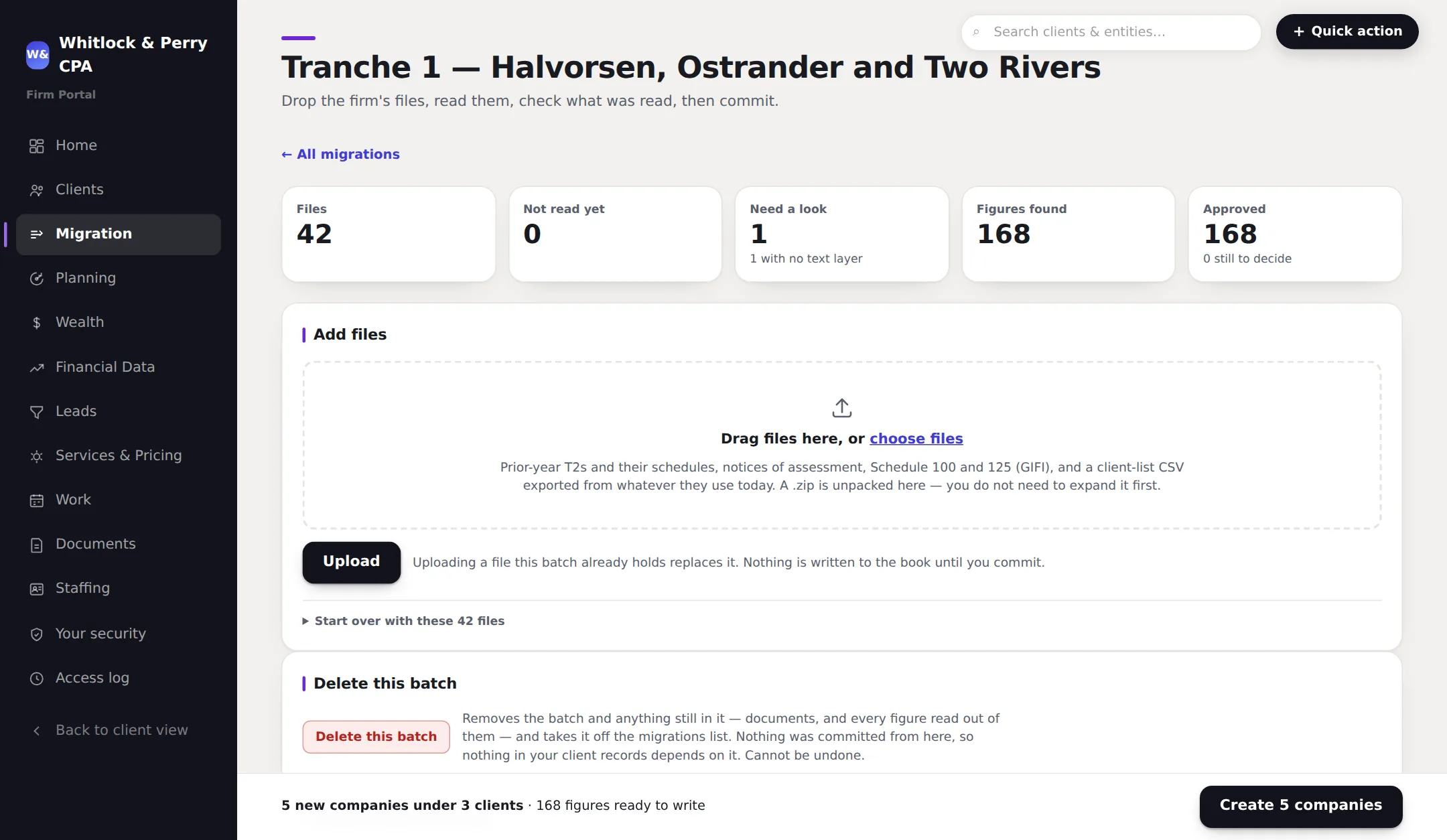
Migration — your back book, read
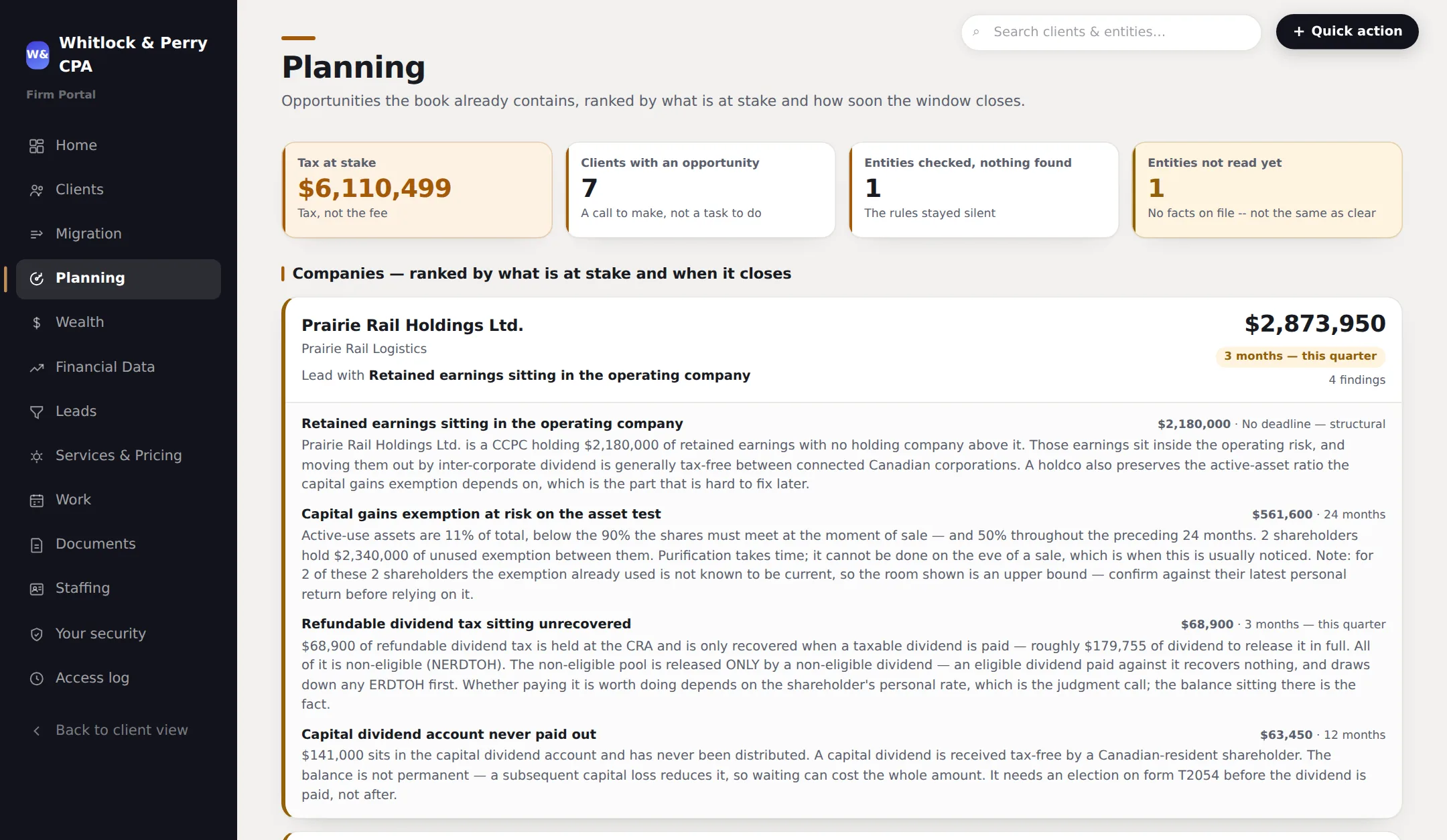
Planning — what those files were hiding
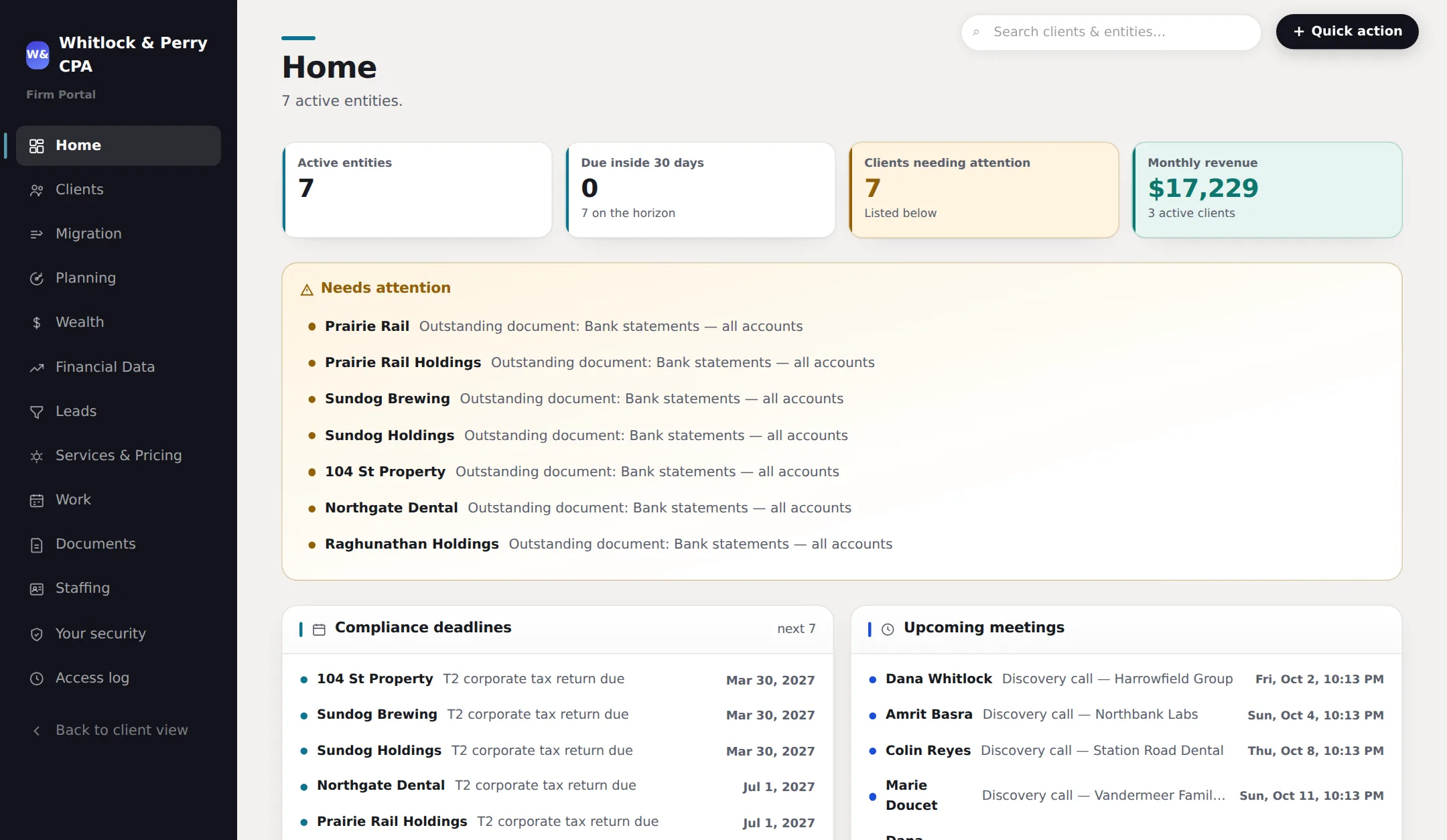
Firm Portal — your team
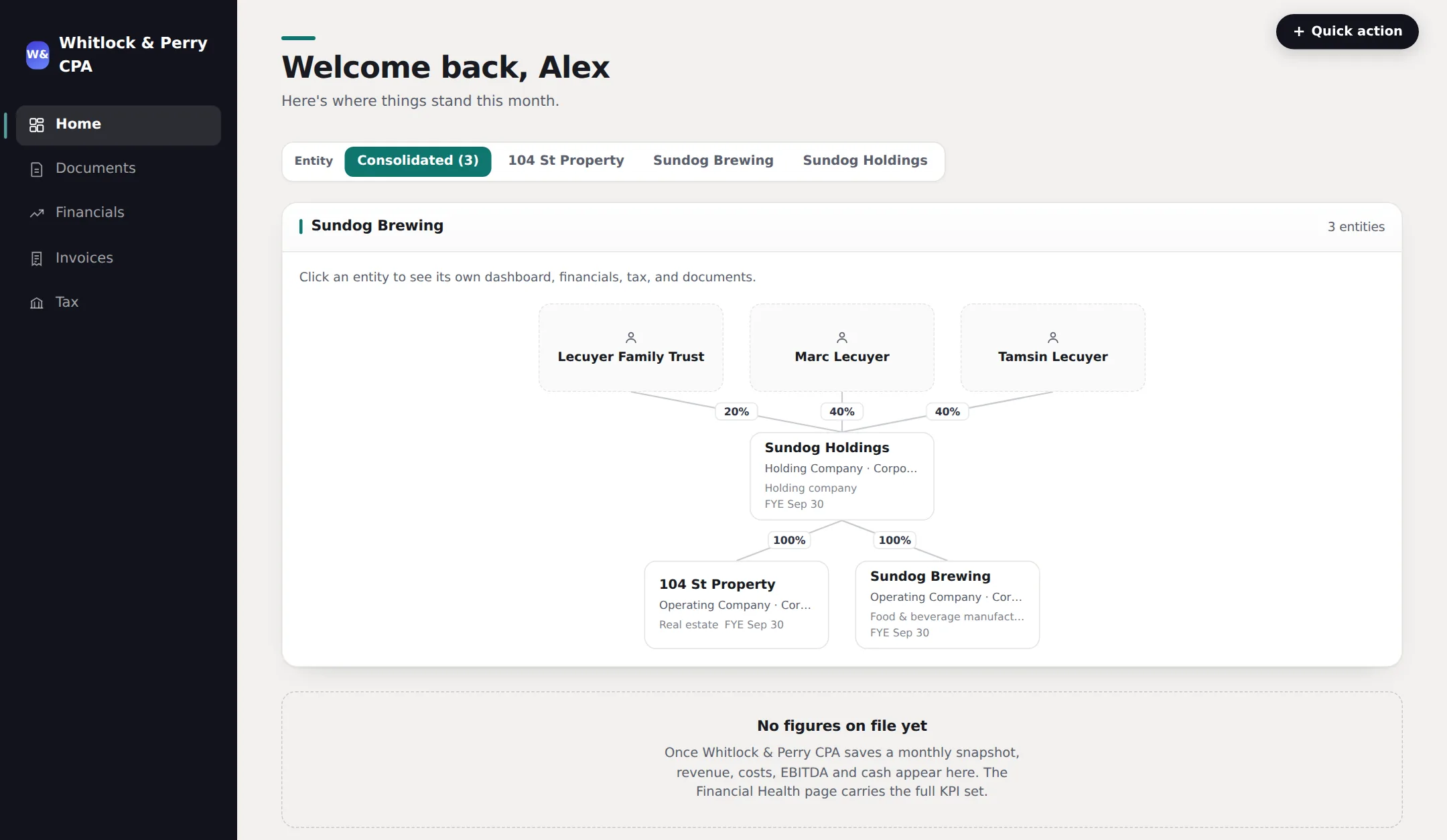
Client Portal — the businesses you serve
Illustrative views with sample data — not a live client file.
Everything a bookkeeping, accounting, tax or advisory firm needs
One system, not five subscriptions
Practice management, a client portal, compliance tracking, engagement letters and billing — built to work together, because they are the same job.
Your back book, read rather than re-keyed
Send the last filed year for every client — T2s and their schedules, T1s, share registers, statements, in whatever folder structure they are already in. The system reads them, builds the clients, the entities and the ownership groups, and carries forward the balances next year's returns depend on: undepreciated capital cost by class, non-capital losses with their expiry years, refundable dividend tax, the capital dividend account, exemption already consumed. Every figure keeps the page it came from. Anything it cannot read, it says so and hands to a person rather than guessing.
Planning triggers, computed from the same files
Once the book is in, the planning rules run against it — exemption headroom before a sale, passive income eroding the small-business deduction, a capital dividend account nobody has paid out, an RRSP conversion deadline at 71. Arithmetic over figures traceable to a filed return, which is why a partner can defend one line by line. The system surfaces the question; the CPA answers it.
The personal side of an owner-manager file
A date of birth, a home address and a province of residence off the personal return, the assets and liabilities that appear on no filing, and an after-tax net worth projection per person. The half of an owner-manager engagement that lives in a spreadsheet on somebody's desktop.
Clients and entities, properly modelled
One relationship can hold a holdco, an opco and a personal file — each with its own fiscal year end, GST frequency, business number and tax province. Not one flat client list with the group structure living in someone's head.
Document collection that closes itself out
Request what you need for a file; the client uploads it from their own login against that request. You see what's outstanding across the whole firm, not per-client — and nothing arrives as an email attachment you have to file by hand.
Canadian compliance, computed
GST/HST returns and filing frequency, CRA representative authorization, corporate tax estimates, installments and filing deadlines derived automatically from each entity's own fiscal year end.
Work tracking through the close
Month-end and year-end jobs per entity, with target dates, estimated hours, the level the work needs and who's assigned. A firm-wide view of what's in progress, what's ready for review, and what hasn't started.
Engagement letters with real acceptance
Your firm's master terms plus per-engagement scope, sent from the file and accepted by the client with a typed legal name and timestamp — recorded against the engagement, not sitting in a mailbox.
Invoicing and payment, in the same place
Raise invoices with line items and your own numbering, take payment by card, or sync what you've already billed from QuickBooks Online or Xero. Clients see and pay them in their portal.
Run the practice
A firm-wide view, not thirty client folders
Every outstanding document request, every job mid-close, every engagement letter waiting on a signature — across the whole client base, on one screen. Search jumps straight to any client, entity or file.
- Staff levels and permissions — who can see revenue, cost rates, scheduling and client fees
- Jobs assigned by level and headcount, with estimated hours against the work
- Leads tracked through to a client file, so nothing sits in an inbox
- Financial statements per entity, with GIFI codes mapped for the return
What your clients see
Their own login, under your brand
Your logo, your colours, your firm’s name on every screen and every email. Clients upload what you asked for, read their own numbers, pay invoices and book time with your team — without another round of email attachments.
- Documents requested, uploaded and matched to the right entity
- Their financial position and this month's deliverables, as you're working them
- Invoices to view and pay, and their own tax picture and deadlines
- Book time with your team against your real availability
Built for Canada
Compliance that isn’t an afterthought
Most practice-management software is built for a US firm and leaves Canadian compliance to a spreadsheet beside it. This is the part that is hardest to bolt on later, so it is the part that was built first.
GST/HST
Filing frequency and basis set per entity — monthly, quarterly or annual, cash or accrual. Returns tracked from not-yet-filed through assessed, with net tax and the balance owing on the file.
CRA representative authorization
The authorization step tracked per entity and per business number, so you know which files you can actually act on and which are still waiting on the client.
Corporate tax
T2 estimates from the entity's own figures, CCPC status, small-business-deduction allocation across an associated group, passive income, and installment schedules.
Deadlines that compute themselves
Filing and installment dates derived from each entity's fiscal year end rather than typed into a spreadsheet every year and quietly going stale.
Compliance is the door
The planning work is already in your files
Advisory is the most requested service in the profession and the worst paid, because it gets billed by the hour next to the compliance work it came out of. The problem was never finding clients who need planning. It is that the trigger turns up in a month-end nobody was reading for it.
Group structure that stopped fitting
An opco carrying retained earnings and no holdco above it. Associated companies sharing one small-business deduction. Structures that were right at incorporation and have not been looked at since.
Exemptions nobody has claimed
Shares approaching the lifetime capital gains exemption with no purification done and no family trust in place — visible years before a sale, which is the only time it can still be fixed.
Compensation mix set once and left
Salary and dividend splits that stopped being optimal two rate changes ago, sitting in the same payroll and shareholder accounts you already reconcile every month.
An owner who is going to exit
76% of Canadian small business owners intend to exit within the decade and 9% have a plan. Your file already knows the owner's age bracket, the year end and what the shares are worth.
Numberyard raises the question. You answer it. The system flags the pattern out of data you already maintain — it does not compute a strategy, file a position, or tell a client what to do. That judgment is yours, it is what the fee is for, and it is the part with your name on it.
Where the AI actually is
It does the data entry. You do the judgment.
Every tool in this category now claims AI. The question a professional should ask is what it is allowed to decide — because your name, not the vendor’s, is on the return.
It reads the tax documents
A Notice of Assessment, GST notice, T1 or T2 goes in; legal name, address, business number, year end and the balances printed on the page come out, into a form already filled in. Every field is null unless it is literally printed — nothing is inferred, nothing is guessed at.
It categorizes the bank statement
For clients with no bank feed, a statement PDF or transaction export is read transaction by transaction and sorted into revenue, cost of sales and operating expenses — with transfers, owner draws and loan principal flagged as not P&L activity at all.
It learns each client, not “everyone”
Teach it once that a given description is always a particular category and that rule is applied to every future upload for that entity, ahead of the model’s own guess. The relationship gets more accurate the longer it runs, the way a real bookkeeper does.
A person signs off on all of it
Nothing an extraction produces is written to a file. It pre-fills a form your staff review, correct and save. The work it removes is typing; the work it never touches is judgment — which is the part your name is on.
The bar is deliberately conservative: an extraction never writes to the database. It fills in a form a staff member reviews. That is the difference between software that saves an hour of typing and software that quietly puts a wrong number on a filing.
Why this one
Against what a Canadian firm is actually running today
Most practice-management software is built for a US firm and priced per seat. The rest of the market is a general ledger, a mailbox, and a folder of spreadsheets holding the compliance together.
| Numberyard | US-built practice suites | Ledger, email & spreadsheets | |
|---|---|---|---|
| Canadian GST/HST, CRA authorization, T2 estimates | Built into the file | Bolted on, or absent | Your own spreadsheet |
| Client portal under your own brand | Included, every client | Extra module or per-client fee | Email attachments |
| Holdco / opco groups as real entities | First-class, per entity | One flat client list | Folder naming conventions |
| Engagement letters with recorded acceptance | In the file, signed | Usually a separate product | A Word template |
| AI data entry a person reviews before it saves | Standard | Varies | Not applicable |
| Pricing | One price per user, unlimited clients | Per seat plus per client, or per module | Per subscription, times several |
Comparison by category, not by vendor — features and pricing across this market change often enough that naming products would date this page within a quarter.
Up and running
How it works
No implementation project, no data-migration consultant.
Set up your firm
Your name, your logo, your colours. Client-facing screens carry your brand, not ours — your clients never see Numberyard.
Bring your clients across
Add each relationship and its entities, or let a client complete their own onboarding — including reading the figures off an uploaded Notice of Assessment to pre-fill the file.
Run the month
Request documents, work the close, file the returns, send the invoice. Your clients see progress in their own portal instead of emailing you to ask.
Simple pricing
One price per user
One product, one price, no tiers and no modules. You pay for the people in your firm who use it — never for the number of clients you serve, and never for a client logging in to their own portal. Take on a hundred new clients and the bill does not move.
CAD, per user
- ✓Unlimited clients and entities
- ✓Client portal logins are never billable
- ✓Every feature on this page, no tiers
- ✓Two months free on annual prepayment
- ✓14-day trial, no card to start
For investors
Raising a seed round, quietly, before it’s public
The deck, five-year model and business plan are available to approved investors after a short confidentiality agreement.
Design partners
5 of 5 design partner places are open
Five Canadian firms, free until the tax engine ships and then price locked at $199 per seat. Design partners decide which planning strategies get encoded first — that is the whole point of the cohort, and it only works while it is small.
Not ready for that?
Join the early access list instead and we’ll send an invite code as places open up beyond the design partner cohort.
Already have an invite code? Go straight to setup →